
You can have a prospecting database, a LinkedIn subscription, an email platform, and a CRM, then still finish the month wondering where the next client will come from.
The problem may be how those tools work together.
For B2B service businesses, lead generation tools should support a clear process: find suitable companies, identify the right people, start relevant conversations, and keep opportunities moving.
Before adding another subscription, identify the step that needs help.
This guide compares five tools by their role in that process, with practical advice on choosing a setup your team can manage.
What Are Lead Generation Tools?
Lead generation tools help businesses identify potential customers, research accounts, capture inquiries, or start sales conversations.
Different tools handle different jobs. A prospecting database helps you find contacts. An enrichment platform adds context. An outreach platform supports campaigns. A CRM helps your team manage what happens next.
Understanding those differences matters. Buying a tool for sending emails will not automatically solve a problem with targeting or proposal follow-up.
Lead Generation Tools Compared
The recommendations below reflect each platform’s documented capabilities. The right choice depends on your sales process, budget, and team capacity.
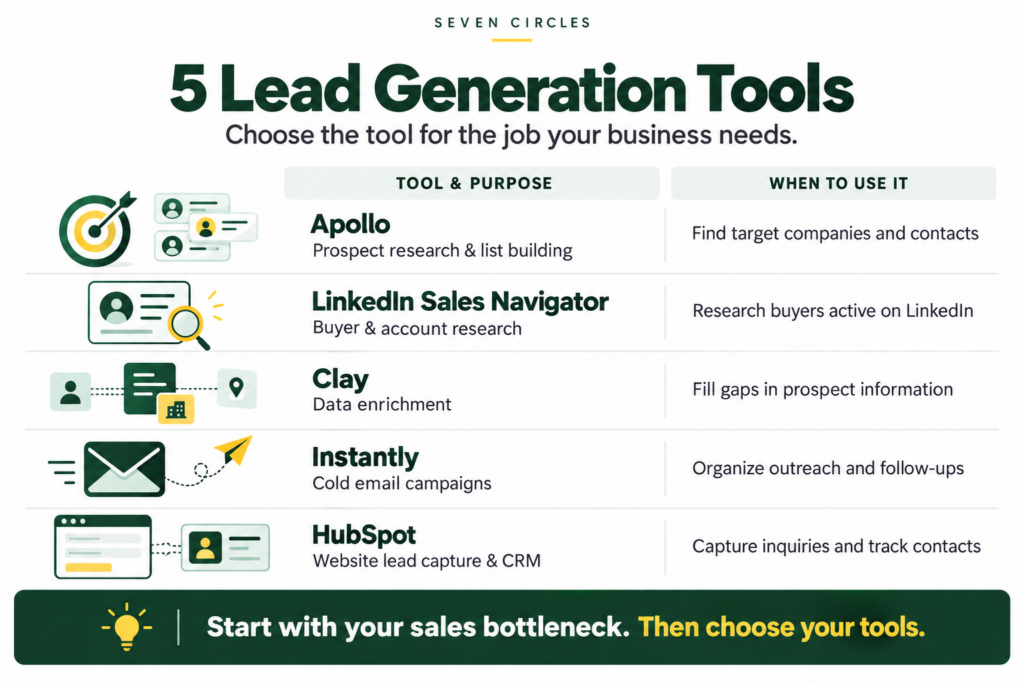
You do not need every tool on this list. Start with the function your current process is missing.
1. Apollo: For Building a Focused Prospect List
Apollo provides B2B prospecting and sales intelligence capabilities that help teams identify potential customers and organize searches around their ideal customer profile.
For a service business, the starting point should be a clear account definition.
For example, an IT consulting firm might focus on companies within a specific size range and industry, then identify the people responsible for technology decisions.
That produces a more purposeful list than collecting everyone with a senior job title.
Before choosing Apollo, ask:
- Have we defined the companies we serve best?
- Do we know which roles influence the purchase?
- Who will review records before outreach?
A database makes prospecting easier to organize. Your targeting decisions determine whether the resulting list is useful.
2. LinkedIn Sales Navigator: For Buyer and Account Research
LinkedIn Sales Navigator offers lead and account search filters that help users narrow their searches and organize relevant prospects.
It can fit businesses where relationships and professional credibility play a meaningful role in buying decisions.
A consulting firm, for example, can use it to identify leaders at target accounts, then review their professional context before starting a conversation.
The practical value comes from doing something with that research.
Instead of sending the same introduction to every prospect, use relevant information to decide whether a conversation makes sense and what question to ask.
Choose a clear next step: save the prospect, review the account, or begin a relevant conversation. Avoid building lists that nobody works.
3. Clay: For Adding Context to Prospect Data
Clay brings together data enrichment and research capabilities to help teams build more complete prospect records.
It becomes useful when your team repeatedly needs information that is missing from its initial list.
Before building an enrichment workflow, decide which information changes your sales decision.
That could include:
- Whether the company fits your target market.
- Whether a contact holds a relevant role.
- Whether an account deserves further research.
- What information your team needs before reaching out.
Every additional field should have a purpose. A complicated spreadsheet can consume time without making qualification easier.
For a small team with a simple prospecting process, manual research may be enough initially.
4. Instantly: For Organizing Cold Email Outreach
Instantly supports cold outreach campaigns and provides ways to add leads to those campaigns.
It is worth considering when your team already has a defined audience, relevant messaging, and someone responsible for handling replies.
Set up the response process before launching.
Who answers an interested prospect? What happens when someone says, “Contact me next quarter”? Where does a qualified conversation get recorded?
Those decisions connect campaign activity to sales work.
Review outcomes such as:
- Positive replies.
- Qualified conversations.
- Meetings that actually take place.
- Opportunities created.
- Clients won.
Sending volume alone does not tell you whether your campaign is helping the business grow.
5. HubSpot: For Capturing and Managing Inbound Leads
HubSpot forms can collect information from website visitors and create or update CRM records.
That makes it relevant when potential customers already visit your website and need a clear way to inquire.
For a B2B service business, a useful form might invite visitors to request an assessment or discuss a specific problem.
Keep the form focused on information your team needs to take the next step.
Then assign responsibility for the inquiry. A captured contact becomes useful when someone reviews it, responds, and records the outcome.
Evaluate the full journey from form submission to sales conversation.
How to Choose Lead Generation Tools for Your Business
Start with the point where your process breaks.
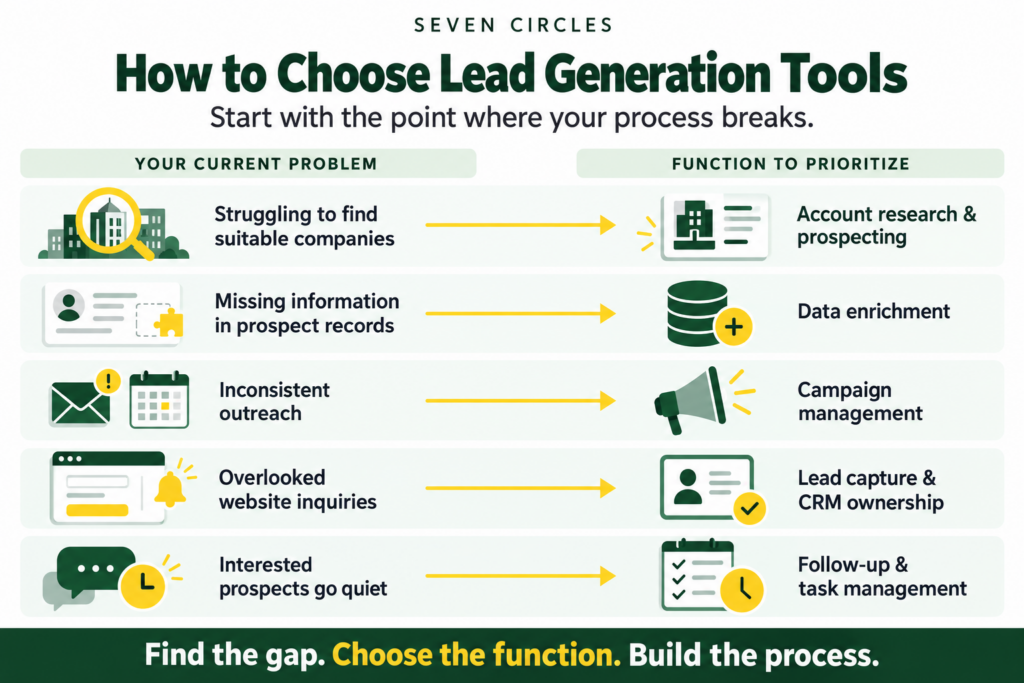
Next, calculate the full cost. Include subscriptions, setup, data usage, and the time needed to operate the tools.
Also check whether information can move between platforms without creating duplicate records or repeated manual work. Confirm relevant integration and subscription requirements before purchasing.
Build a Process Your Team Can Run
Before buying another tool, document five things:
- The companies you want to reach.
- The people you need to speak with.
- The reason your offer matters to them.
- The person responsible for each next step.
- The outcomes you will review each week.
Then choose tools that support those decisions.
For a small business, a manageable starting setup may be one prospecting method, one outreach channel, and one place to track conversations.
Expand when a specific need justifies it.
Frequently Asked Questions
What are the best lead generation tools for small B2B businesses?
The right tools depend on the task. Apollo and LinkedIn Sales Navigator support prospecting, Clay supports enrichment, Instantly supports cold email campaigns, and HubSpot supports website lead capture and CRM records. Choose around your current bottleneck.
Do I need several lead generation tools?
No. Begin with the smallest setup that supports your process. Add another platform when you can explain what problem it will solve and who will manage it.
Can lead generation tools guarantee clients?
No. Results also depend on your audience, offer, messaging, follow-up, and sales conversations. Software supports those activities.
How should I measure lead generation performance?
Track qualified conversations, meetings held, opportunities, clients won, and acquisition costs. Review those outcomes alongside campaign activity so you can see where prospects stop progressing.
Connect Your Tools to a Clear Revenue Process
Seven Circles helps B2B service businesses connect prospecting, LinkedIn and cold email outreach, CRM workflows, and follow-up into a clearer sales process.
If your tools generate activity but your team struggles to turn it into opportunities, start by reviewing how leads move through your business.
Complete our application form so Seven Circles can understand your business goals and how we can help.